NAB opened at Las Vegas today with some nice new touches. There are benches along the walkways. Which means you see far less people squatting by the wall along the sides of the halls. Benches in the middle of the walkway also means you better watch where you're going.
The first day usually begins with meeting people and the - 'long time' hellos, hugging, back-slapping stuff. And studying maps and directories making a plan.
As usual I started with the South Hall and the biggest difference is apparent as soon as you enter. There's no Apple stall. And further down you realize there's no Avid stall either. For years these have been how you began NAB South Hall.
But Autodesk, Quantel, DaVinci, Digital Vision, DVS - are all there and getting bigger and better. Eyeon Digital Fusion too has a big stall nestled between these 'big boys'. DaVinci and Quantel have new colourist panels looking very impressive. Lustre and Nucoda have the same panels still looking impressive. But colourist panels are looking pretty similar to each other - evolutionary not revolutionary.
Blackmagic Design is down the hall with the same large diagonal open stall that's been their design for years now. Blackmagic announced a new large router, a new HD Extreme, and many small and nifty converters — and a small 'video recorder'. Check them out here.
AJA doesn't have any new capture card, but announced new mini converters with economical pricing.
I saw a detailed description of the new BlueArc Titan 3000 storage and why it's the better option for graphics facilities that deal with file sequences. And a good — and honest — comparison with XSan to show how it can actually co-exist with BlueArc.
For the rest of the day I took in many bits and pieces of new stuff which hopefully I'll get to play later in the year.
In the evening Avid showed up in style. At 'The Joint' in the Hard Rock Hotel. At a crowded user meet, Avid made some 'New Thinking' announcements. New Media Composer hardware, new Mojo, new Nitris system and some others.
For people who bought Symphonies and Nitris sometime last year this might be disappointing, But for new followers into the fold, this might be the tipping point to 'go back to Avid'. On their web site they call it Avid Delivers Ultimate HD Editing Experience.
Will this turn things around for Avid? Has Avid gotten to that point yet? And will it matter? Are questions that 2008 will undoubtedly answer.
Wednesday, 16 April 2008


Saturday, 15 March 2008
Media content repurposing - A view from India
These days I've been getting a lot of queries on this - media repurposing. Sounds like a new buzz word, but this can become serious business in the next few years.
Media repurposing consists of taking existing media - 35mm print/neg, DigiBeta/BetaSP/U-matic/VHS/DV tapes, an other media - and converting them to a format more friendly to new media vehicles. And playable on mobile phones, portable media players, or sent over a wire or wireless to homes and offices.
IPTV and VOD are two such new vehicles. IPTV is Internet Protocol Television and VOD is Video on Demand.
IPTV consists of sending video to viewers over the normal Internet. In India MTNL (and other services) show many cable TV channels over their broadband internet line - sent to homes over a telephone line.
VOD is when a viewer can go through a menu or index, and choose what he/she wants to see. That content is then played immediately, or downloaded over the Internet or wireless to view later.
Where IPTV and VOD differ from normal TV is that in normal TV many TV channels are being broadcast simultaneously all the time over a cable. In IPTV, only the channel the viewer wants to see is transmitted.
In VOD, only the actual program the viewer wants to see is beamed for as long as the viewer wants to see it. So VOD is sort of like watching a movie on a flight after selecting it from a menu. Like movies downloaded over the iTunes store for AppleTV. Or, in India Movies on Demand from Eros.
But Eros's Movie on Demand only work with PCs as it needs to detect Windows Media Player, which no Mac has. So if you have a MacBook, or iMac or any other Mac, forget Eros.
Other VOD examples are, of course, YouTube, or for really good-looking movies, Vimeo.
While repurposing media, it is also possible to break the programme down and classify it intelligently - like chapters in a DVD so viewers can see a portion of the entire programme. Like songs in a Hindi movie, or important scenes. Or like innings or overs in a cricket test match, ODI or T20 match.
How about going through a list of Hindi film songs and narrowing that down to Shahrukh Khan-Rani Mukherjee songs and selecting one you'd like to see. Or through a list of cricket matches and selecting one of Sachin's heart-breaking nineties collection. Or centuries by Rahul Dravid. Reliving that World Cup semi-final 2003. Whatever. And whenever. Without having to see a TV schedule.
To get to this level of choice to a viewer, one would have to convert tapes and films of entire movies or match coverages to digital files. And along the way, or after digitization, intelligently break down these files or 'mark' them with interesting 'chapter points'.
In India there are quite a few parties who own or have access to many thousands of hours of programmes - entire feature films, TV serials, cricket matches. And now want to convert them and make them available to users in the future via new media vehicles like Internet, Video over mobile, DTH TV (Tata Sky and DishTV), cable set-top boxes and other future 'pipelines'.
The challenge in repurposing media is to work out systems and infrastructure that can handle an initial load of thousands of hours while still being commercially viable handling the lower ongoing load over time.
Meaning you might need a certain number of systems and infrastructure to convert and classify, say, 10,000 hours of programming in a reasonable time of, say, 3 months. But after that is done, new programing may need to be converted at only 1000 hours or less per month. This earlier infrastructure is too large for that small a load leading to wastage. The trick is in creating an ideal size of setup that can do both.
The other issue is standards. What file format does one convert to? MPEG-2, H.264, VC-1, WMV, Flash...? Many formats exist. And the servers that handle and deliver these files also work with one or more of these standards. So the delivery vehicle and its standards dictates what the encoding is done as.
But typically, encoding to either of these formats is a one-way street. Meaning if one does the conversion, then changes the delivery architecture or provider, and a different standard is needed, then cross-conversion is not lossless and can even ruin the picture.
So, typically, converting to a low loss intermediate standard first then the final compression can permit some standards independence. Or, of course, one can convert to multiple standards and keep all available.
There are other challenges - secure storage, Digital Rights Management (DRM) or anti-piracy, restoration before repurposing, edit-ability of converted material. More on that sometime later.
Media repurposing consists of taking existing media - 35mm print/neg, DigiBeta/BetaSP/U-matic/VHS/DV tapes, an other media - and converting them to a format more friendly to new media vehicles. And playable on mobile phones, portable media players, or sent over a wire or wireless to homes and offices.
IPTV and VOD are two such new vehicles. IPTV is Internet Protocol Television and VOD is Video on Demand.
IPTV consists of sending video to viewers over the normal Internet. In India MTNL (and other services) show many cable TV channels over their broadband internet line - sent to homes over a telephone line.
VOD is when a viewer can go through a menu or index, and choose what he/she wants to see. That content is then played immediately, or downloaded over the Internet or wireless to view later.
Where IPTV and VOD differ from normal TV is that in normal TV many TV channels are being broadcast simultaneously all the time over a cable. In IPTV, only the channel the viewer wants to see is transmitted.
In VOD, only the actual program the viewer wants to see is beamed for as long as the viewer wants to see it. So VOD is sort of like watching a movie on a flight after selecting it from a menu. Like movies downloaded over the iTunes store for AppleTV. Or, in India Movies on Demand from Eros.
But Eros's Movie on Demand only work with PCs as it needs to detect Windows Media Player, which no Mac has. So if you have a MacBook, or iMac or any other Mac, forget Eros.
Other VOD examples are, of course, YouTube, or for really good-looking movies, Vimeo.
While repurposing media, it is also possible to break the programme down and classify it intelligently - like chapters in a DVD so viewers can see a portion of the entire programme. Like songs in a Hindi movie, or important scenes. Or like innings or overs in a cricket test match, ODI or T20 match.
How about going through a list of Hindi film songs and narrowing that down to Shahrukh Khan-Rani Mukherjee songs and selecting one you'd like to see. Or through a list of cricket matches and selecting one of Sachin's heart-breaking nineties collection. Or centuries by Rahul Dravid. Reliving that World Cup semi-final 2003. Whatever. And whenever. Without having to see a TV schedule.
To get to this level of choice to a viewer, one would have to convert tapes and films of entire movies or match coverages to digital files. And along the way, or after digitization, intelligently break down these files or 'mark' them with interesting 'chapter points'.
In India there are quite a few parties who own or have access to many thousands of hours of programmes - entire feature films, TV serials, cricket matches. And now want to convert them and make them available to users in the future via new media vehicles like Internet, Video over mobile, DTH TV (Tata Sky and DishTV), cable set-top boxes and other future 'pipelines'.
The challenge in repurposing media is to work out systems and infrastructure that can handle an initial load of thousands of hours while still being commercially viable handling the lower ongoing load over time.
Meaning you might need a certain number of systems and infrastructure to convert and classify, say, 10,000 hours of programming in a reasonable time of, say, 3 months. But after that is done, new programing may need to be converted at only 1000 hours or less per month. This earlier infrastructure is too large for that small a load leading to wastage. The trick is in creating an ideal size of setup that can do both.
The other issue is standards. What file format does one convert to? MPEG-2, H.264, VC-1, WMV, Flash...? Many formats exist. And the servers that handle and deliver these files also work with one or more of these standards. So the delivery vehicle and its standards dictates what the encoding is done as.
But typically, encoding to either of these formats is a one-way street. Meaning if one does the conversion, then changes the delivery architecture or provider, and a different standard is needed, then cross-conversion is not lossless and can even ruin the picture.
So, typically, converting to a low loss intermediate standard first then the final compression can permit some standards independence. Or, of course, one can convert to multiple standards and keep all available.
There are other challenges - secure storage, Digital Rights Management (DRM) or anti-piracy, restoration before repurposing, edit-ability of converted material. More on that sometime later.
Friday, 22 February 2008
Backup without hassles
Everyone knows they have to back up their work. Nearly everyone has lost some data from drive or computer failure. Almost no one makes backups, or at least not often enough to make a difference. And when you really need a backup, the latest one is usually the only one of value. And mostly if its over a week old, its useless.
I've been in this as well and have somehow managed to find one possible solution. This is 'a' solution not 'the' solution. And I've been using it for a few months now.
Lacie Silverkeeper
It ships with every LaCie hard disk on a CD. But you can download it at the link above. And its free.
Very simple to use. Just decide which folder should be backed up. To where it has to be backed up - usually a Firewire or USB hard disk. And make a schedule for the back up. Mine is 9 am every day. Yes, every single day.
On the first day, it takes a while because all the stuff on the folder you specify is copied to the target. The next day and thereafter, only files that have changed are copied and overwritten. Overwritten, remember.
Files you delete from the folder you're backing up are deleted off the backup as well. So the backup is always an exact clone of the original. You can change this delete behaviour with one setting 'Never remove files'. I've done that. And you can specify excluded items. So I've marked 'Documents' for backup, but excluded 'Final Cut Pro Documents' from the backup.
You can decide to make multiple copies. So it you set that to 5, Silverkeeper will back up and make a new set each day, but keep 5 sets, deleting the next oldest one in rotation. I've not used this option.
Besides backing up data, a good backup solution should also help in restoring backed up data. I had occasion to test that. When I upgraded my MacBook Pro to Leopard I did 'Erase and Install'. So I lost everything - photos, music, videos, documents, Mail, FCP projects.
After Leopard installed, I just connected my backup drive and copied the backup folders in their appropriate places, and had my old MacBook back. I chose to do this manually as I wanted to pick and choose what I wanted back. Great way to get rid of clutter. But there's also a restore option that does this for you.
Very simply, LaCie Silverkeeper works. At their site LaCie say it works with Tiger up to 10.4.11, but not with Leopard. I'm using it with Leopard on my laptop. Seems to work. But then Leopard has Time Machine. I've yet to try that.
Silverkeeper only works on a Mac. For Windows, there's 1-Click also free and from LaCie. This too is on the CD that comes with every laCie drive.
Western Digital also ship backup software with their drives. I tried it
once, but I must confess I didn't give it much time since I was already using Silverkeeper and it worked for me.
Again, backup is important, everyone knows that. With Silverkeeper, the excuses to not backup just reduced by one.
Now to look for a great software to remove duplicates all over one's hard disk...
I've been in this as well and have somehow managed to find one possible solution. This is 'a' solution not 'the' solution. And I've been using it for a few months now.
Lacie Silverkeeper
It ships with every LaCie hard disk on a CD. But you can download it at the link above. And its free.
Very simple to use. Just decide which folder should be backed up. To where it has to be backed up - usually a Firewire or USB hard disk. And make a schedule for the back up. Mine is 9 am every day. Yes, every single day.
On the first day, it takes a while because all the stuff on the folder you specify is copied to the target. The next day and thereafter, only files that have changed are copied and overwritten. Overwritten, remember.
Files you delete from the folder you're backing up are deleted off the backup as well. So the backup is always an exact clone of the original. You can change this delete behaviour with one setting 'Never remove files'. I've done that. And you can specify excluded items. So I've marked 'Documents' for backup, but excluded 'Final Cut Pro Documents' from the backup.
You can decide to make multiple copies. So it you set that to 5, Silverkeeper will back up and make a new set each day, but keep 5 sets, deleting the next oldest one in rotation. I've not used this option.
Besides backing up data, a good backup solution should also help in restoring backed up data. I had occasion to test that. When I upgraded my MacBook Pro to Leopard I did 'Erase and Install'. So I lost everything - photos, music, videos, documents, Mail, FCP projects.
After Leopard installed, I just connected my backup drive and copied the backup folders in their appropriate places, and had my old MacBook back. I chose to do this manually as I wanted to pick and choose what I wanted back. Great way to get rid of clutter. But there's also a restore option that does this for you.
Very simply, LaCie Silverkeeper works. At their site LaCie say it works with Tiger up to 10.4.11, but not with Leopard. I'm using it with Leopard on my laptop. Seems to work. But then Leopard has Time Machine. I've yet to try that.
Silverkeeper only works on a Mac. For Windows, there's 1-Click also free and from LaCie. This too is on the CD that comes with every laCie drive.
Western Digital also ship backup software with their drives. I tried it
once, but I must confess I didn't give it much time since I was already using Silverkeeper and it worked for me.
Again, backup is important, everyone knows that. With Silverkeeper, the excuses to not backup just reduced by one.
Now to look for a great software to remove duplicates all over one's hard disk...
Sunday, 17 February 2008
Anything Under The Sun - autsun.com
Anything Under The Sun and the link is
www.autsun.com
A new online shopping site based in New Delhi, India. My film maker friend Dev Benegal, who's from Delhi, but spent a larger part of his life in Mumbai, recently pointed it out to me.
Autsun.com, have a rather nice variety of things. I've checked out only the computer and electronics portion, but that is growing. That's because, what makes this site different is that if you don't see what you want, you can recommend it along with a preferred price. And they try to get it and offer it for your price.
I wanted to see a Canon HV-20 - fast becoming a cult camcorder in the indie film circuit - so I recommended it. And they now have it. Available in India, free shipping anywhere in India, the Canon HV-20 for just Indian Rupees 70,000.00.
A lot of people will Google the HV-20 and come across prices like US$ 800, even 750. But hey, that's for the NTSC version. The PAL version is US$ 1200 at least and that's before taxes. Add Indian Customs Duty and it gets to 70k anyway.
Earlier, my friend Dev recommended autsun.com a Western Digital MyBook Studio Edition 1 Tb hard disk, and they now have it there. 1 Tb for under Rs 16,000 or so. Great for video editing and backups. It has Firewire 800, USB, eSATA and is small.
Autsun also sell iMacs, MacBooks and other such.
Another interesting item is the Sony HC 96 camcorder. autsun.com is the only place I've come accross this camcorder. No Croma, no Sony showroom, no Vijay Sales. No one has the HC 96.
What's special about the Sony HC 96 is that it is the only DV camcorder left that has DV in and out. The other models like the HC 36, 26, 38, 28 whatever, all have analog out, DV out, but no DV in. And no analog in DV out. What's called 'analog in, DV-passthrough'.
And since the HC-96 is a Sony it will play back miniDV and DVCam tapes. Canon, Panasonic, and JVC will not play back DVCam. So if you need a good capture deck for DV/DVCam for film editing, and have the ability to capture live from a analog source into your MacBook on location (like a video assist) then the HC 96 is the only current camcorder that can do it. And as far as I can tell, only autsun has it.
I just realized that don't know these guys from Adam (or Eve) and have not yet bought anything from them, but I'm still recommending them. So please speak to them, do your research, and make your own choices.
www.autsun.com
A new online shopping site based in New Delhi, India. My film maker friend Dev Benegal, who's from Delhi, but spent a larger part of his life in Mumbai, recently pointed it out to me.
Autsun.com, have a rather nice variety of things. I've checked out only the computer and electronics portion, but that is growing. That's because, what makes this site different is that if you don't see what you want, you can recommend it along with a preferred price. And they try to get it and offer it for your price.
I wanted to see a Canon HV-20 - fast becoming a cult camcorder in the indie film circuit - so I recommended it. And they now have it. Available in India, free shipping anywhere in India, the Canon HV-20 for just Indian Rupees 70,000.00.
A lot of people will Google the HV-20 and come across prices like US$ 800, even 750. But hey, that's for the NTSC version. The PAL version is US$ 1200 at least and that's before taxes. Add Indian Customs Duty and it gets to 70k anyway.
Earlier, my friend Dev recommended autsun.com a Western Digital MyBook Studio Edition 1 Tb hard disk, and they now have it there. 1 Tb for under Rs 16,000 or so. Great for video editing and backups. It has Firewire 800, USB, eSATA and is small.
Autsun also sell iMacs, MacBooks and other such.
Another interesting item is the Sony HC 96 camcorder. autsun.com is the only place I've come accross this camcorder. No Croma, no Sony showroom, no Vijay Sales. No one has the HC 96.
What's special about the Sony HC 96 is that it is the only DV camcorder left that has DV in and out. The other models like the HC 36, 26, 38, 28 whatever, all have analog out, DV out, but no DV in. And no analog in DV out. What's called 'analog in, DV-passthrough'.
And since the HC-96 is a Sony it will play back miniDV and DVCam tapes. Canon, Panasonic, and JVC will not play back DVCam. So if you need a good capture deck for DV/DVCam for film editing, and have the ability to capture live from a analog source into your MacBook on location (like a video assist) then the HC 96 is the only current camcorder that can do it. And as far as I can tell, only autsun has it.
I just realized that don't know these guys from Adam (or Eve) and have not yet bought anything from them, but I'm still recommending them. So please speak to them, do your research, and make your own choices.
Sunday, 4 November 2007
Really portable film editing
I've been using all kinds of external Firewire hard disks for editing with FCP systems. Since 2003. LaCie, Maxtor, Western Digital, Seagate. But Firewire. Not USB. USB has ben believed to be unsuitable for film editing work because of the continuous throughput that editing demands can't be supplied by USB. I thought so as well.
Editing on the go with laptops - has been possible for some years now. But the older G4 PowerBooks were underpowered for anything but the shortest of edits - commercials, music videos - no more. I've done a fair bit. But no feature films - 3 hrs long, tonnes of rush clips.
For storage I've used normal desktop hard disks which had power supplies, cables, quite a mess. I've just finished editing a feature this way.
The smaller 2.5 in. hard disks lacked the capacity and speed to be considered for any feature work. But now, I think I've just found one.
I went out and bought a Western Digital WDPassport 250 GB drive. I bought it online on eBay India (formerly baazee.com) for just under Rs 10,000. a bit steep, my friends tell me you can get one on Lamington Road or Nehru Place for under Rs 8,000.
Anyway, I bought it online, it was delivered to my home, much simpler than finding parking at Lamington Road and walking in the Sun. Worth the premium.
I transferred all the film rushes from my LaCie 500 GB drive to the WD Passport. 183 GB. It took about 3 hrs. So the disk can write sustained at 1GB/min. 17MB/sec sustained write. Pretty good.
I opened my film edit project, reconnected to media now on the USB drive. And stitched all the reel sequences together. So I had a sequence of a little over 2 hrs. 24@25, DV-PAL with over 1500 cuts. And all sound was from separately captured clips from a Nagra. And some music and SFX tracks. Video was on one layer except for some dissolves and a very few two-layer supers.
All these was playing off media as DV-PAL clips all on the WD Passport 250GB connected via USB and powered via USB as well - a truly portable little drive.
I kept the stop playback on dropped frames warning on. And played out the sequence full screen. And let it go. 2 hrs later, the sequence finished playing and had played through without a hitch. An entire film edit.
So I have no doubt I can edit on this as well. Because during edit one is playing in bursts. Often playing the same segment over and over again with small changes.
So I think I've finally found a truly portable, USB-powered large capacity but small size hard disk. Capable of being used as main storage for editing an Indian feature film.
Caveat is I've only used this for a day. I haven't used it in a really hot place. Subjected it to heat and vibration. And done an real edit with it. But at least it can play our randomly spread out clips in a sustained manner for 2 hrs.
If it fails, Western Digital has a great exchange under warranty policy in India. Just go to their web site, enter the drive number, our name and address. And a courier picks it up from your home. After they get it. they ship a new one back to you.
More on the drive from Western Digital web site.
And a review and comparison with other drives at Tom's hardware.
This review on Tom's hardware is about the actual hard disk that goes inside the WDPassport 250 GB. But good enough. And I read the review after buying the drive.
Another review is here...
The actual model is WDXMS2500TN. And Western Digital sell it online at their site for Rs 8,000.00
Great drive. Does the job. Reasonably priced. But don't buy it for over Rs 8,000.00. Its available in 5 colours.
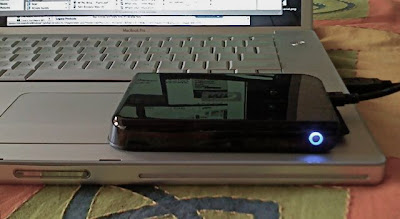
The drive sitting on my MacBook Pro. Its that small.
Editing on the go with laptops - has been possible for some years now. But the older G4 PowerBooks were underpowered for anything but the shortest of edits - commercials, music videos - no more. I've done a fair bit. But no feature films - 3 hrs long, tonnes of rush clips.
For storage I've used normal desktop hard disks which had power supplies, cables, quite a mess. I've just finished editing a feature this way.
The smaller 2.5 in. hard disks lacked the capacity and speed to be considered for any feature work. But now, I think I've just found one.
I went out and bought a Western Digital WDPassport 250 GB drive. I bought it online on eBay India (formerly baazee.com) for just under Rs 10,000. a bit steep, my friends tell me you can get one on Lamington Road or Nehru Place for under Rs 8,000.
Anyway, I bought it online, it was delivered to my home, much simpler than finding parking at Lamington Road and walking in the Sun. Worth the premium.
I transferred all the film rushes from my LaCie 500 GB drive to the WD Passport. 183 GB. It took about 3 hrs. So the disk can write sustained at 1GB/min. 17MB/sec sustained write. Pretty good.
I opened my film edit project, reconnected to media now on the USB drive. And stitched all the reel sequences together. So I had a sequence of a little over 2 hrs. 24@25, DV-PAL with over 1500 cuts. And all sound was from separately captured clips from a Nagra. And some music and SFX tracks. Video was on one layer except for some dissolves and a very few two-layer supers.
All these was playing off media as DV-PAL clips all on the WD Passport 250GB connected via USB and powered via USB as well - a truly portable little drive.
I kept the stop playback on dropped frames warning on. And played out the sequence full screen. And let it go. 2 hrs later, the sequence finished playing and had played through without a hitch. An entire film edit.
So I have no doubt I can edit on this as well. Because during edit one is playing in bursts. Often playing the same segment over and over again with small changes.
So I think I've finally found a truly portable, USB-powered large capacity but small size hard disk. Capable of being used as main storage for editing an Indian feature film.
Caveat is I've only used this for a day. I haven't used it in a really hot place. Subjected it to heat and vibration. And done an real edit with it. But at least it can play our randomly spread out clips in a sustained manner for 2 hrs.
If it fails, Western Digital has a great exchange under warranty policy in India. Just go to their web site, enter the drive number, our name and address. And a courier picks it up from your home. After they get it. they ship a new one back to you.
More on the drive from Western Digital web site.
And a review and comparison with other drives at Tom's hardware.
This review on Tom's hardware is about the actual hard disk that goes inside the WDPassport 250 GB. But good enough. And I read the review after buying the drive.
Another review is here...
The actual model is WDXMS2500TN. And Western Digital sell it online at their site for Rs 8,000.00
Great drive. Does the job. Reasonably priced. But don't buy it for over Rs 8,000.00. Its available in 5 colours.

The drive sitting on my MacBook Pro. Its that small.
Sunday, 30 September 2007
But does it look like film
After I described by IBC Red experience to friends and colleagues here, and after I posted a small note on it. One of the commonest questions I get are "But does it look like film?" meaning the Red camera's images.
People ask this of not just the Red camera, but also the Viper, Arri D-20, Dalsa, Si2k, CineAlta even HDV camcorders. I think we're getting close to the point where this will not really matter. I've seen images from all these cameras, not all off film. And I can say that they all have a 'certain look' about them. It is not consistently 'not film' nor consistently 'exactly like film'. But distinctive.
So also the Red camera. It has a 'certain look' about it.
To make this a bit clearer, lets draw a parallel from still photography. For still photography not too many people are using film cameras any more. Even in India. Some years ago, as digital still cameras got better and better, one often heard this question "But does it look like film?" Asked of non-film still cameras.
When was the last time you heard someone ask this of a digital still camera? For holiday pictures, weddings, events, sports, news, even fashion photography. Does a digital still camera's 'looking like film' or not come in the way of its use. For that matter, who remembers exactly what film looked like? For stills, I mean.
So also digital movie making. We will get to the point when people will stop asking "But does it look like film?", simply because not too many will remember. And you will select the Red or any other digital camera because...
it helps you tell your story
it is possible to shoot digital
is convenient to shoot digital
it saves some money to shoot digital against film
the post production is convenient and predictable especially grading
your film will be shown digitally in a digital theatre
your film will be sold as DVD maybe HD-DVD and/or purchased as a download
Some of these reasons are valid today some aren't. especially cost, not yet. Eventually they all will. And then we will make an occasion of watching a weaving and bobbing, centre-hot, scratched and dirty print in a 'period theatre' and probably ask "How did people see this stuff for eighty years?"
As an aside, after my post on the Red, one company in California kindly offered a Red on rent. Link here...
http://www.elysianpictures.com/red-rental.htm
I'm not sure if they will come over to India. But if you are shooting in the US this is a thing to try. Shoot on their Red, bring back the files, and I'll manage the post here in Mumbai.
People ask this of not just the Red camera, but also the Viper, Arri D-20, Dalsa, Si2k, CineAlta even HDV camcorders. I think we're getting close to the point where this will not really matter. I've seen images from all these cameras, not all off film. And I can say that they all have a 'certain look' about them. It is not consistently 'not film' nor consistently 'exactly like film'. But distinctive.
So also the Red camera. It has a 'certain look' about it.
To make this a bit clearer, lets draw a parallel from still photography. For still photography not too many people are using film cameras any more. Even in India. Some years ago, as digital still cameras got better and better, one often heard this question "But does it look like film?" Asked of non-film still cameras.
When was the last time you heard someone ask this of a digital still camera? For holiday pictures, weddings, events, sports, news, even fashion photography. Does a digital still camera's 'looking like film' or not come in the way of its use. For that matter, who remembers exactly what film looked like? For stills, I mean.
So also digital movie making. We will get to the point when people will stop asking "But does it look like film?", simply because not too many will remember. And you will select the Red or any other digital camera because...
it helps you tell your story
it is possible to shoot digital
is convenient to shoot digital
it saves some money to shoot digital against film
the post production is convenient and predictable especially grading
your film will be shown digitally in a digital theatre
your film will be sold as DVD maybe HD-DVD and/or purchased as a download
Some of these reasons are valid today some aren't. especially cost, not yet. Eventually they all will. And then we will make an occasion of watching a weaving and bobbing, centre-hot, scratched and dirty print in a 'period theatre' and probably ask "How did people see this stuff for eighty years?"
As an aside, after my post on the Red, one company in California kindly offered a Red on rent. Link here...
http://www.elysianpictures.com/red-rental.htm
I'm not sure if they will come over to India. But if you are shooting in the US this is a thing to try. Shoot on their Red, bring back the files, and I'll manage the post here in Mumbai.
Sunday, 23 September 2007
The Red camera is real
Just back from IBC 2007 at Amsterdam. I saw the Red camera up close.
First, I saw a large screen presentation of 'Crossing the line' a film shot on the Red camera. Directed by Peter Jackson, its a war story. The film was shown in a large theatre - as large as Metro in Mumbai. Really huge screen.
But the 'Red film' was not on film 35 mm. It was a digital 4k screening off the new Sony 4k digital projector. Presumably playing 4k files from a Clipster. It looked great, really good. No grain, no scratches or spots of dust, clean sharp picture, great contrast and saturation. But did it look like film? More on that later in a separate post.
I also went up to the Red stall and saw their presentation on work flow. As well as a small presentation at Apple's stand and Assimilate Scratch.
Here are some work flows...
For now, the camera shoots 4k RAW files to a memory card. later it will shoot to a removable hard disk. So it will shoot to 8 Gb CompactFlash cards. It shoots as RAW images just like Digital SLRs do for still photography. An 8 Gb card is good for 4 mins. I need to re-check at what res its 4 mins.
After the shoot you connect the card via a card reader to FCP and you can 'transfer' not capture these files via a new 'Log and transfer' window. Here you see all your shots as clips. You choose shots even mark in and out, and transfer them to your hard disk. The raw files are transferred and there's a reference Quicktime that opens in FCP as a 2k Quicktime clip.
Then edit away at 2k or even downres to Pro-res, Apple's new nearly lossless codec. After you are done, you can make an EDL and send it to Assimilate Scratch. Scratch, is a grading system running on Windows. Scratch connects your EDL to the original 4k files. And you can then grade 4k.
Once done grading, you can export to dpx, 4k or 2k depending on your film recorder. Then record out to film.
All this is work flow that's here and now and demoed. No one has actually done all this for an entire feature length film, so one doesn't know how it will all hold up to the rigours of a real schedule.
And other manufacturers - DaVinci Resolve, Nucoda Film Master - told me they were in talks with Red to use the Red codec in their app so they too can work with Red RAW files. The months to come will show interesting work flows. Maybe even FCP-Color will show up a complete Red work flow.
Examples of Red images
http://gallery.mac.com/videoresources#100050
First, I saw a large screen presentation of 'Crossing the line' a film shot on the Red camera. Directed by Peter Jackson, its a war story. The film was shown in a large theatre - as large as Metro in Mumbai. Really huge screen.
But the 'Red film' was not on film 35 mm. It was a digital 4k screening off the new Sony 4k digital projector. Presumably playing 4k files from a Clipster. It looked great, really good. No grain, no scratches or spots of dust, clean sharp picture, great contrast and saturation. But did it look like film? More on that later in a separate post.
I also went up to the Red stall and saw their presentation on work flow. As well as a small presentation at Apple's stand and Assimilate Scratch.
Here are some work flows...
For now, the camera shoots 4k RAW files to a memory card. later it will shoot to a removable hard disk. So it will shoot to 8 Gb CompactFlash cards. It shoots as RAW images just like Digital SLRs do for still photography. An 8 Gb card is good for 4 mins. I need to re-check at what res its 4 mins.
After the shoot you connect the card via a card reader to FCP and you can 'transfer' not capture these files via a new 'Log and transfer' window. Here you see all your shots as clips. You choose shots even mark in and out, and transfer them to your hard disk. The raw files are transferred and there's a reference Quicktime that opens in FCP as a 2k Quicktime clip.
Then edit away at 2k or even downres to Pro-res, Apple's new nearly lossless codec. After you are done, you can make an EDL and send it to Assimilate Scratch. Scratch, is a grading system running on Windows. Scratch connects your EDL to the original 4k files. And you can then grade 4k.
Once done grading, you can export to dpx, 4k or 2k depending on your film recorder. Then record out to film.
All this is work flow that's here and now and demoed. No one has actually done all this for an entire feature length film, so one doesn't know how it will all hold up to the rigours of a real schedule.
And other manufacturers - DaVinci Resolve, Nucoda Film Master - told me they were in talks with Red to use the Red codec in their app so they too can work with Red RAW files. The months to come will show interesting work flows. Maybe even FCP-Color will show up a complete Red work flow.
Examples of Red images
http://gallery.mac.com/videoresources#100050
Thursday, 19 July 2007
Editing on the cheap
As part of supervising the film DI process at a post facility I often visit editing suites all over Mumbai, where film edits are done. And I can't help thinking that editing systems - especially those used for editing feature films - are getting more and more 'on the cheap'.
Time was when - only a few years ago - if you wanted to set up a film edit suite, you had to get an Avid Media Composer. Avid charged a lot of money for those systems, but for the money they really gave you the goodies. Money's worth.
Large 20 in. monitors - NEC or Mitsubishi, the best. Good quality speakers. Fast and reliable Avid SCSI drives, and the latest fastest Mac with loads of RAM and a huge internal disk. You had to get all of this from them.
Then came the Media Composer ABVB systems. And the 'cheaping out' began. You could chose your monitor so many people got the cheapest TVM or ACI 14in monitors. some noname computer speakers or even a cheap amp and speakers, and 'assembled' beige SCSI cases with ugly ribbon cables.
FCP came along and the cheaping get worse and today its gotten really really low. FCP meant for the first time you could buy the Mac of your choice, start with the least amount of RAM and after the first few slow-downs add a gig or two. Few people even pirated FCP.
They got the cheapest monitors, because Cinema displays were so expensive. And for disks, bargained with the Lamington Road types and got the one that was just a thousand Rupees cheaper.
So I go to these dingy little 'editing rooms' all over Andheri.
Bad stinking chairs. Low light. Airconditioners that are noisy or uncool. Plywood walls. Tables of the wrong height and cluttered with no place for keyboards. Keyboards with no key caps. Cheap Logitech (or worse) mouses... and so on.
Software thats mismatched. Old versions of MacOSX sometimes incompatible with FCP versions. BM or Kona drivers with not recommended Quicktime versions. I mean updates don't cost money, do they?
So basically the freedom to choose your system specs and peripherals has been abused to the limit. This is manifest as EDLs that don't work, edits that hang the machine just playing them back, corrupt projects - a nightmare for DI.
The cheapening has also meant hiring the cheapest inexperienced machine-room-guy turned editor.
Avid systems are no better. Because of the initial cost many are still using old WinNT versions with no working USB or Firewire ports so taking out edits for reference means compulsarily doing BetaSP layoffs. On old Beta VTRs that have troubling recording a tracking free picture for feature length movies. Sound may or may not record to both channels. Timecode may or may not be consistent. Even Adrenaline systems 2 or more years old are no better.
Editors who work on these old systems are young in age but old in thought. They don't trust Quicktime movies, have no clue on image and video file formats haven't bothered to read up about Firewire or USB drives. But they are 25-30 years old and use the latest mobile phones.
But things will come full circle. And some new directors and editors are now seeing the value in getting systems up to spec for trouble-free edit finishing. And hiring assistants who are themselves up to speed on new technologies and formats.
For anyone who feels the same way I'm willing to throw my hat in the ring and set up, and even rent out systems that are up there and can guarantee you editing in peace. If you can get a clean decent place, I can give you the system to match. Any takers?
Time was when - only a few years ago - if you wanted to set up a film edit suite, you had to get an Avid Media Composer. Avid charged a lot of money for those systems, but for the money they really gave you the goodies. Money's worth.
Large 20 in. monitors - NEC or Mitsubishi, the best. Good quality speakers. Fast and reliable Avid SCSI drives, and the latest fastest Mac with loads of RAM and a huge internal disk. You had to get all of this from them.
Then came the Media Composer ABVB systems. And the 'cheaping out' began. You could chose your monitor so many people got the cheapest TVM or ACI 14in monitors. some noname computer speakers or even a cheap amp and speakers, and 'assembled' beige SCSI cases with ugly ribbon cables.
FCP came along and the cheaping get worse and today its gotten really really low. FCP meant for the first time you could buy the Mac of your choice, start with the least amount of RAM and after the first few slow-downs add a gig or two. Few people even pirated FCP.
They got the cheapest monitors, because Cinema displays were so expensive. And for disks, bargained with the Lamington Road types and got the one that was just a thousand Rupees cheaper.
So I go to these dingy little 'editing rooms' all over Andheri.
Bad stinking chairs. Low light. Airconditioners that are noisy or uncool. Plywood walls. Tables of the wrong height and cluttered with no place for keyboards. Keyboards with no key caps. Cheap Logitech (or worse) mouses... and so on.
Software thats mismatched. Old versions of MacOSX sometimes incompatible with FCP versions. BM or Kona drivers with not recommended Quicktime versions. I mean updates don't cost money, do they?
So basically the freedom to choose your system specs and peripherals has been abused to the limit. This is manifest as EDLs that don't work, edits that hang the machine just playing them back, corrupt projects - a nightmare for DI.
The cheapening has also meant hiring the cheapest inexperienced machine-room-guy turned editor.
Avid systems are no better. Because of the initial cost many are still using old WinNT versions with no working USB or Firewire ports so taking out edits for reference means compulsarily doing BetaSP layoffs. On old Beta VTRs that have troubling recording a tracking free picture for feature length movies. Sound may or may not record to both channels. Timecode may or may not be consistent. Even Adrenaline systems 2 or more years old are no better.
Editors who work on these old systems are young in age but old in thought. They don't trust Quicktime movies, have no clue on image and video file formats haven't bothered to read up about Firewire or USB drives. But they are 25-30 years old and use the latest mobile phones.
But things will come full circle. And some new directors and editors are now seeing the value in getting systems up to spec for trouble-free edit finishing. And hiring assistants who are themselves up to speed on new technologies and formats.
For anyone who feels the same way I'm willing to throw my hat in the ring and set up, and even rent out systems that are up there and can guarantee you editing in peace. If you can get a clean decent place, I can give you the system to match. Any takers?
Friday, 6 July 2007
24p and 25p in one camcorder
I wrote earlier that some camcorders can do 24p or 25p depending on where they are sold. But there are some that can do both - as well as NTSC and PAL in SD mode.
JVC camcorders for one.
An entire range of camcorders can do 720 at 24p as well as 25p. They are the GY-HD100, HD101, HD110, HD111, HD200, HD201, HD251.
The GY-HD100, HD101, HD110, HD111 can do 720 at 24p an 25p
and SD-PAL at 25p, 50p, 50i and NTSC at 60p
(but not 720 at 50p and 60p)
And the HD200, HD201, HD251 can do 720 at 24p an 25p and
720 at 50p and 60p
(but not SD-PAL at 50p and NTSC at 60p).
Very complicated, but JVC has all this in a table called 'hdv-comparisons_1.pdf' at their site somewhere.
Mind that all these JVC camcorders do 720 and not 1080. And whether or not these modes capture fine into FCP - can't say till I hav e actually tried al on the PAL version.
The Canon XL-H1 is another that can do both. It needs to be 'service-centre modified' to do that. The PAL version that can do 1080 at 50i and 25F natively, can, with the optional upgrade do 60i, 30F and 24F.
And, of course the NTSC version can do 60i, 30F and 24F natively and with the optional upgrade do 50i and 24F.
So you can get the camcorder from anywhere and still do a variety of formats. But this camcorder does 1080, and not 720.
What is the 'F' behind 24, 25, and 30? At Canon's site there is a document that explains it thus...
'These Frame modes have the same look as progressive frame rates, but are not labeled
“progressive” because they are created with an interlaced chip. The end result is exactly the
same to the editing system (and to our eyes) as 30p and 24p, respectively.'
Apart from the JVC and Canon cameras, I don't know of any other camcorder that can do 24p and 25p. Of course, if you're stuck with some other camcorder that can so one or the other, you can look up my CinemaTools workaround in and earlier post.
JVC camcorders for one.
An entire range of camcorders can do 720 at 24p as well as 25p. They are the GY-HD100, HD101, HD110, HD111, HD200, HD201, HD251.
The GY-HD100, HD101, HD110, HD111 can do 720 at 24p an 25p
and SD-PAL at 25p, 50p, 50i and NTSC at 60p
(but not 720 at 50p and 60p)
And the HD200, HD201, HD251 can do 720 at 24p an 25p and
720 at 50p and 60p
(but not SD-PAL at 50p and NTSC at 60p).
Very complicated, but JVC has all this in a table called 'hdv-comparisons_1.pdf' at their site somewhere.
Mind that all these JVC camcorders do 720 and not 1080. And whether or not these modes capture fine into FCP - can't say till I hav e actually tried al on the PAL version.
The Canon XL-H1 is another that can do both. It needs to be 'service-centre modified' to do that. The PAL version that can do 1080 at 50i and 25F natively, can, with the optional upgrade do 60i, 30F and 24F.
And, of course the NTSC version can do 60i, 30F and 24F natively and with the optional upgrade do 50i and 24F.
So you can get the camcorder from anywhere and still do a variety of formats. But this camcorder does 1080, and not 720.
What is the 'F' behind 24, 25, and 30? At Canon's site there is a document that explains it thus...
'These Frame modes have the same look as progressive frame rates, but are not labeled
“progressive” because they are created with an interlaced chip. The end result is exactly the
same to the editing system (and to our eyes) as 30p and 24p, respectively.'
Apart from the JVC and Canon cameras, I don't know of any other camcorder that can do 24p and 25p. Of course, if you're stuck with some other camcorder that can so one or the other, you can look up my CinemaTools workaround in and earlier post.
Saturday, 16 June 2007
24p or 25p for film on HDV
Most people who plan on using HDV for eventual film output choose camcorders that can do 24p or 24 progressive. To get clean field-free frames.
Not all camcorders can do 'real' 24p shooting. Sony's Z1 has a Cineframe mode thats not really 24p, but 60i 'packaged' as 24p. Other Sony camcorders like the new V1 can do 24p. Canon's XL-H1, XH-A1 and XH-G1 all do 24p as does the prosumer HV-20.
That's what you'll find at their web sites. But there's one gotcha in this. Only the NTSC version, or the US/Japan version that shoots NTSC 60i can do 24p. The European, and South East Asian versions that are built for PAL 50i can do 25p not 24p.
So the gotcha is that is you get a camcorder to do occasional 24p work, you're stuck with one that can shoot only NTSC in SD. Or 60i in HD. If, on the other hand you need a camcorder that's good for PAL SD or HD, then you cannot shoot 24p. Only 25p.
Cameras from Dubai, Singapore, Malaysia, or even India will be PAL 50i camcorders that will do only 25p. Those from the US, Japan and other NTSC countries will do 24p but NTSC in SD.
What's the solution? Get two of them?
Not really. One workaround is to shoot 25p for film projects. Capture and edit at 25p. But 'conform' the final edited 25p film to 24p using FCP. The length will increase, and sound will get slower and slightly lower in pitch, but at least you'll have 24p without any motion artifacts.
Not all camcorders can do 'real' 24p shooting. Sony's Z1 has a Cineframe mode thats not really 24p, but 60i 'packaged' as 24p. Other Sony camcorders like the new V1 can do 24p. Canon's XL-H1, XH-A1 and XH-G1 all do 24p as does the prosumer HV-20.
That's what you'll find at their web sites. But there's one gotcha in this. Only the NTSC version, or the US/Japan version that shoots NTSC 60i can do 24p. The European, and South East Asian versions that are built for PAL 50i can do 25p not 24p.
So the gotcha is that is you get a camcorder to do occasional 24p work, you're stuck with one that can shoot only NTSC in SD. Or 60i in HD. If, on the other hand you need a camcorder that's good for PAL SD or HD, then you cannot shoot 24p. Only 25p.
Cameras from Dubai, Singapore, Malaysia, or even India will be PAL 50i camcorders that will do only 25p. Those from the US, Japan and other NTSC countries will do 24p but NTSC in SD.
What's the solution? Get two of them?
Not really. One workaround is to shoot 25p for film projects. Capture and edit at 25p. But 'conform' the final edited 25p film to 24p using FCP. The length will increase, and sound will get slower and slightly lower in pitch, but at least you'll have 24p without any motion artifacts.
Subscribe to:
Posts (Atom)