Another great small drive from Western Digital for editors on the go. Now available at AutSun for a shade over Rs 10,000.
I had written about an earlier model Western Digital pocket drive 250 GB on my blog. I used one of those with my MacBook Pro to edit a feature on. With Final Cut Pro.
All rushes for the feature, nearly 170 GB at DV-PAL were copied on to the WD pocket drive and connected via USB to my MacBook Pro. Through many months of editing, presentations, playouts for sound, and exports for preview DVDs - the kind of stuff that goes into feature film editing - the drive held firm.
No dropped frames, no crashes.
Now this new drive has 320 GB as well as Firewire and USB interfaces. It should be even faster and even more reliable. The advantage of the USB port is that you can reliably use your Firewire bus to take on a deck/camcorder or even a Mojo if you edit on a new Avid MC. And its bus-powered so no more lugging around and connecting a power supply, cables and such.
The price at AutSun is reasonable and only marginally more than the US online price. But hey, the US online price doesn't include taxes, and shipping. So it might even be cheaper to buy from Autsun than from WD itself.
Recommended. A great buy for the mobile editor.
Showing posts with label Western Digital. Show all posts
Showing posts with label Western Digital. Show all posts
Friday, 4 July 2008


Friday, 22 February 2008
Backup without hassles
Everyone knows they have to back up their work. Nearly everyone has lost some data from drive or computer failure. Almost no one makes backups, or at least not often enough to make a difference. And when you really need a backup, the latest one is usually the only one of value. And mostly if its over a week old, its useless.
I've been in this as well and have somehow managed to find one possible solution. This is 'a' solution not 'the' solution. And I've been using it for a few months now.
Lacie Silverkeeper
It ships with every LaCie hard disk on a CD. But you can download it at the link above. And its free.
Very simple to use. Just decide which folder should be backed up. To where it has to be backed up - usually a Firewire or USB hard disk. And make a schedule for the back up. Mine is 9 am every day. Yes, every single day.
On the first day, it takes a while because all the stuff on the folder you specify is copied to the target. The next day and thereafter, only files that have changed are copied and overwritten. Overwritten, remember.
Files you delete from the folder you're backing up are deleted off the backup as well. So the backup is always an exact clone of the original. You can change this delete behaviour with one setting 'Never remove files'. I've done that. And you can specify excluded items. So I've marked 'Documents' for backup, but excluded 'Final Cut Pro Documents' from the backup.
You can decide to make multiple copies. So it you set that to 5, Silverkeeper will back up and make a new set each day, but keep 5 sets, deleting the next oldest one in rotation. I've not used this option.
Besides backing up data, a good backup solution should also help in restoring backed up data. I had occasion to test that. When I upgraded my MacBook Pro to Leopard I did 'Erase and Install'. So I lost everything - photos, music, videos, documents, Mail, FCP projects.
After Leopard installed, I just connected my backup drive and copied the backup folders in their appropriate places, and had my old MacBook back. I chose to do this manually as I wanted to pick and choose what I wanted back. Great way to get rid of clutter. But there's also a restore option that does this for you.
Very simply, LaCie Silverkeeper works. At their site LaCie say it works with Tiger up to 10.4.11, but not with Leopard. I'm using it with Leopard on my laptop. Seems to work. But then Leopard has Time Machine. I've yet to try that.
Silverkeeper only works on a Mac. For Windows, there's 1-Click also free and from LaCie. This too is on the CD that comes with every laCie drive.
Western Digital also ship backup software with their drives. I tried it
once, but I must confess I didn't give it much time since I was already using Silverkeeper and it worked for me.
Again, backup is important, everyone knows that. With Silverkeeper, the excuses to not backup just reduced by one.
Now to look for a great software to remove duplicates all over one's hard disk...
I've been in this as well and have somehow managed to find one possible solution. This is 'a' solution not 'the' solution. And I've been using it for a few months now.
Lacie Silverkeeper
It ships with every LaCie hard disk on a CD. But you can download it at the link above. And its free.
Very simple to use. Just decide which folder should be backed up. To where it has to be backed up - usually a Firewire or USB hard disk. And make a schedule for the back up. Mine is 9 am every day. Yes, every single day.
On the first day, it takes a while because all the stuff on the folder you specify is copied to the target. The next day and thereafter, only files that have changed are copied and overwritten. Overwritten, remember.
Files you delete from the folder you're backing up are deleted off the backup as well. So the backup is always an exact clone of the original. You can change this delete behaviour with one setting 'Never remove files'. I've done that. And you can specify excluded items. So I've marked 'Documents' for backup, but excluded 'Final Cut Pro Documents' from the backup.
You can decide to make multiple copies. So it you set that to 5, Silverkeeper will back up and make a new set each day, but keep 5 sets, deleting the next oldest one in rotation. I've not used this option.
Besides backing up data, a good backup solution should also help in restoring backed up data. I had occasion to test that. When I upgraded my MacBook Pro to Leopard I did 'Erase and Install'. So I lost everything - photos, music, videos, documents, Mail, FCP projects.
After Leopard installed, I just connected my backup drive and copied the backup folders in their appropriate places, and had my old MacBook back. I chose to do this manually as I wanted to pick and choose what I wanted back. Great way to get rid of clutter. But there's also a restore option that does this for you.
Very simply, LaCie Silverkeeper works. At their site LaCie say it works with Tiger up to 10.4.11, but not with Leopard. I'm using it with Leopard on my laptop. Seems to work. But then Leopard has Time Machine. I've yet to try that.
Silverkeeper only works on a Mac. For Windows, there's 1-Click also free and from LaCie. This too is on the CD that comes with every laCie drive.
Western Digital also ship backup software with their drives. I tried it
once, but I must confess I didn't give it much time since I was already using Silverkeeper and it worked for me.
Again, backup is important, everyone knows that. With Silverkeeper, the excuses to not backup just reduced by one.
Now to look for a great software to remove duplicates all over one's hard disk...
Sunday, 4 November 2007
Really portable film editing
I've been using all kinds of external Firewire hard disks for editing with FCP systems. Since 2003. LaCie, Maxtor, Western Digital, Seagate. But Firewire. Not USB. USB has ben believed to be unsuitable for film editing work because of the continuous throughput that editing demands can't be supplied by USB. I thought so as well.
Editing on the go with laptops - has been possible for some years now. But the older G4 PowerBooks were underpowered for anything but the shortest of edits - commercials, music videos - no more. I've done a fair bit. But no feature films - 3 hrs long, tonnes of rush clips.
For storage I've used normal desktop hard disks which had power supplies, cables, quite a mess. I've just finished editing a feature this way.
The smaller 2.5 in. hard disks lacked the capacity and speed to be considered for any feature work. But now, I think I've just found one.
I went out and bought a Western Digital WDPassport 250 GB drive. I bought it online on eBay India (formerly baazee.com) for just under Rs 10,000. a bit steep, my friends tell me you can get one on Lamington Road or Nehru Place for under Rs 8,000.
Anyway, I bought it online, it was delivered to my home, much simpler than finding parking at Lamington Road and walking in the Sun. Worth the premium.
I transferred all the film rushes from my LaCie 500 GB drive to the WD Passport. 183 GB. It took about 3 hrs. So the disk can write sustained at 1GB/min. 17MB/sec sustained write. Pretty good.
I opened my film edit project, reconnected to media now on the USB drive. And stitched all the reel sequences together. So I had a sequence of a little over 2 hrs. 24@25, DV-PAL with over 1500 cuts. And all sound was from separately captured clips from a Nagra. And some music and SFX tracks. Video was on one layer except for some dissolves and a very few two-layer supers.
All these was playing off media as DV-PAL clips all on the WD Passport 250GB connected via USB and powered via USB as well - a truly portable little drive.
I kept the stop playback on dropped frames warning on. And played out the sequence full screen. And let it go. 2 hrs later, the sequence finished playing and had played through without a hitch. An entire film edit.
So I have no doubt I can edit on this as well. Because during edit one is playing in bursts. Often playing the same segment over and over again with small changes.
So I think I've finally found a truly portable, USB-powered large capacity but small size hard disk. Capable of being used as main storage for editing an Indian feature film.
Caveat is I've only used this for a day. I haven't used it in a really hot place. Subjected it to heat and vibration. And done an real edit with it. But at least it can play our randomly spread out clips in a sustained manner for 2 hrs.
If it fails, Western Digital has a great exchange under warranty policy in India. Just go to their web site, enter the drive number, our name and address. And a courier picks it up from your home. After they get it. they ship a new one back to you.
More on the drive from Western Digital web site.
And a review and comparison with other drives at Tom's hardware.
This review on Tom's hardware is about the actual hard disk that goes inside the WDPassport 250 GB. But good enough. And I read the review after buying the drive.
Another review is here...
The actual model is WDXMS2500TN. And Western Digital sell it online at their site for Rs 8,000.00
Great drive. Does the job. Reasonably priced. But don't buy it for over Rs 8,000.00. Its available in 5 colours.
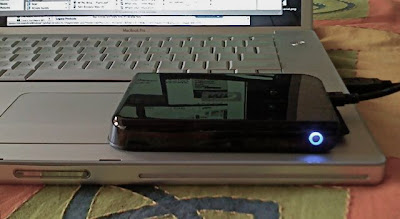
The drive sitting on my MacBook Pro. Its that small.
Editing on the go with laptops - has been possible for some years now. But the older G4 PowerBooks were underpowered for anything but the shortest of edits - commercials, music videos - no more. I've done a fair bit. But no feature films - 3 hrs long, tonnes of rush clips.
For storage I've used normal desktop hard disks which had power supplies, cables, quite a mess. I've just finished editing a feature this way.
The smaller 2.5 in. hard disks lacked the capacity and speed to be considered for any feature work. But now, I think I've just found one.
I went out and bought a Western Digital WDPassport 250 GB drive. I bought it online on eBay India (formerly baazee.com) for just under Rs 10,000. a bit steep, my friends tell me you can get one on Lamington Road or Nehru Place for under Rs 8,000.
Anyway, I bought it online, it was delivered to my home, much simpler than finding parking at Lamington Road and walking in the Sun. Worth the premium.
I transferred all the film rushes from my LaCie 500 GB drive to the WD Passport. 183 GB. It took about 3 hrs. So the disk can write sustained at 1GB/min. 17MB/sec sustained write. Pretty good.
I opened my film edit project, reconnected to media now on the USB drive. And stitched all the reel sequences together. So I had a sequence of a little over 2 hrs. 24@25, DV-PAL with over 1500 cuts. And all sound was from separately captured clips from a Nagra. And some music and SFX tracks. Video was on one layer except for some dissolves and a very few two-layer supers.
All these was playing off media as DV-PAL clips all on the WD Passport 250GB connected via USB and powered via USB as well - a truly portable little drive.
I kept the stop playback on dropped frames warning on. And played out the sequence full screen. And let it go. 2 hrs later, the sequence finished playing and had played through without a hitch. An entire film edit.
So I have no doubt I can edit on this as well. Because during edit one is playing in bursts. Often playing the same segment over and over again with small changes.
So I think I've finally found a truly portable, USB-powered large capacity but small size hard disk. Capable of being used as main storage for editing an Indian feature film.
Caveat is I've only used this for a day. I haven't used it in a really hot place. Subjected it to heat and vibration. And done an real edit with it. But at least it can play our randomly spread out clips in a sustained manner for 2 hrs.
If it fails, Western Digital has a great exchange under warranty policy in India. Just go to their web site, enter the drive number, our name and address. And a courier picks it up from your home. After they get it. they ship a new one back to you.
More on the drive from Western Digital web site.
And a review and comparison with other drives at Tom's hardware.
This review on Tom's hardware is about the actual hard disk that goes inside the WDPassport 250 GB. But good enough. And I read the review after buying the drive.
Another review is here...
The actual model is WDXMS2500TN. And Western Digital sell it online at their site for Rs 8,000.00
Great drive. Does the job. Reasonably priced. But don't buy it for over Rs 8,000.00. Its available in 5 colours.

The drive sitting on my MacBook Pro. Its that small.
Subscribe to:
Posts (Atom)